

Save $149. Save 5% with email subscription. Allow 2 business days for activation code.

FlightScope Face Impact Location Software

Regular price $350.00
Regular price $499.00 Sale price $350.00
Shipping calculated at checkout.
FlightScope offers Club Face Impact Location as a software upgrade for the Mevo+ and Gen2. You must own the Pro package and buy the Face Impact add-on software. Utilize this exclusive new feature in the FS Golf App to enhance your ability to consistently strike the ball in the center of the club face.Full Description
View full details

Description


Face Impact Location for Pro Package

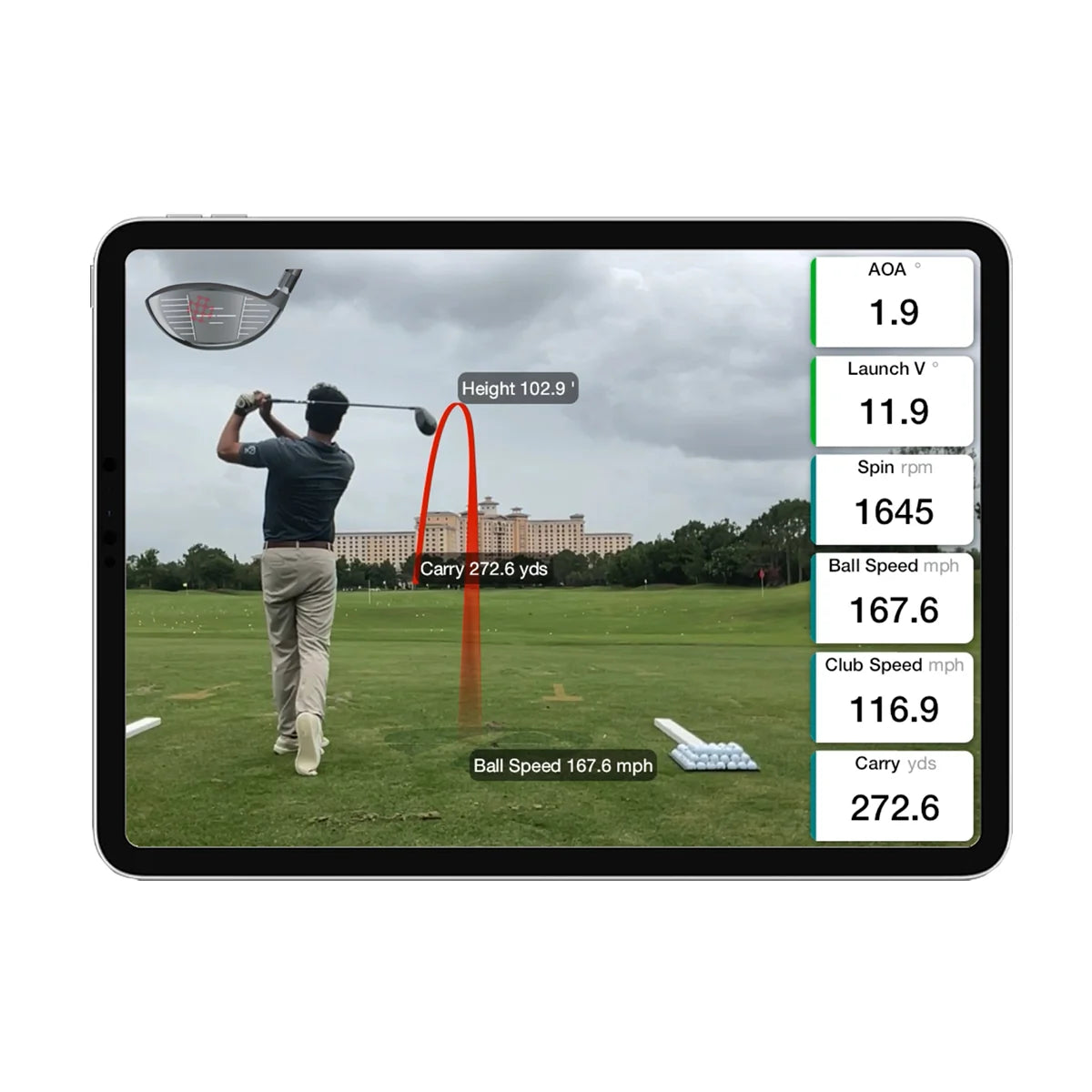
FlightScope offers Club Face Impact Location as a software upgrade for the Mevo+ or Gen2. You must own the Pro package and buy the Face Impact add-on software. Utilize this exclusive new feature in the FS Golf App to enhance your ability to consistently strike the ball in the center of the club face. With Face Impact Location, you can focus on improving accuracy and consistency with wedges, irons, and woods. Instant feedback will aid you in enhancing your overall performance on every shot. Moreover, Face Impact Location provides detailed information on the precise impact location for each club, allowing you to compare it to the shot's data. Additionally, this feature includes two additional data parameters: lateral impact and vertical impact. 

FlightScope’s patented Advanced Fusion Tracking technology requires a minimum light level of 300 lux to accurately measure Face Impact Location. For optimal performance, maintain consistent lighting above 300 lux within a 3-foot radius of the hitting area.

Face Impact Location DTL Page

Unlocking Swing Secrets with Face Impact Location

Master your swing mechanics with the power of Face Impact Location, available exclusively for Mevo+ Pro users. This feature reveals the precise location of your clubface strike on every shot, providing invaluable insights to improve your game.


FlightScope Face Impact Location Features

Detailed Shot AnalysisSelect Face Impact Location as a data parameter on the Trajectory screen or dedicate the entire screen to it. Leverage the full D-Plane dataset to dissect every aspect of your swing and pinpoint areas for improvement.

Face Impact Location is non-refundable as it's a software add-on.

Heat Mapping Visualization: See where you're making contact with the clubface using Heat Mapping Visualization. Identify your "sweet spot" and areas you hit less frequently. This feature displays the distribution of impact points from your practice session, helping you identify strike patterns, evaluate consistency, and pinpoint areas for improvement. Heat mapping is available for all clubs except the putter. 

Available on: FS Golf PC, FS Golf iOS (iPhone and iPad), and FS Golf Android (tablets only).

Shot Grouping: See exactly where each shot makes contact with the clubface throughout your practice session. Shot Grouping displays impact locations for every shot, giving you a clear picture of your strike patterns, accuracy, and consistency. Analyze your results for each club to identify trends, improve ball striking, and achieve more consistent performance. 

Custom Views: View Face Impact Location data in the FS Golf app through multiple display options, including customizable data tiles, 2D and 3D views, and the driving range interface. These flexible viewing options allow you to analyze clubface contact alongside shot data and ball flight, giving you a clearer picture of your accuracy, consistency, and overall performance.

Courses/Software

New FlightScope FS Golf App To Run Face Impact Location


Resources/Space Requirements

FS Golf Mobile 

iPhone: Requires iOS 18.0 or later.

iPad: Requires iPadOS 18.0 or later.

Android Tablet: Running Android 6.0 or later on a 2015 or newer device

FS Golf PC Minimum System Requirements

Operating System: Windows 10 or 11 (64-bit).

Processor (CPU): Intel Core i3-13100 / Ryzen 5 5560 (or higher; some configurations recommend an i5 equivalent).

Memory (RAM): 8GB DDR4 (16GB recommended).

Graphics (GPU): Intel UHD Graphics / Radeon Graphics or better (dedicated GPU like Nvidia 1070 equivalent may be specified for intensive graphic rendering).

Storage: 128GB to 256GB hard drive space with at least 10GB free memory (SSD recommended).

Connectivity: Internet connection and internal 5GHz Wi-Fi card

FAQ

Is the Pro Package required to use Face Impact Location?

No. The Face Impact Location add-on works independently of the Pro Package and can be used with either the FlightScope Mevo Gen2 or Mevo+ without purchasing the Pro Package.

What does FlightScope Face Impact Location do?

Face Impact Location is an add-on feature that shows exactly where the ball makes contact with the clubface on every shot. By combining visual impact locations with detailed shot data, it helps you evaluate strike consistency, identify patterns, and improve your ball striking through three key features:

  • Lateral Impact: Measures how far toward the heel or toe the ball makes contact with the clubface.
  • Vertical Impact: Measures how high or low the ball strikes the clubface relative to the sweet spot.
  • Heat Mapping: Provides a visual representation of your impact locations throughout a practice session, helping you identify strike patterns and evaluate consistency.

What is FlightScope Heat Mapping?

Heat Mapping combines all shots from your practice session into a single, color-coded visual of your clubface impact locations. This makes it easy to identify your most common contact points, evaluate strike consistency, and recognize recurring miss patterns for each club in your bag.

Available on: FS Golf PC, FS Golf iOS (iPhone and iPad), and FS Golf Android (tablets only). Heat Mapping is available for all clubs except the putter.