Foresight Falcon Platinum 15' Epson L695 Golf Simulator Package

Regular price $34,500.00
Regular price $34,500.00 Sale price $34,500.00
Shipping calculated at checkout.
This Foresight Falcon Platinum 15' golf simulator package is the perfect DIY, easy-to-install commercial or home golf simulator kit. The package has everything you need to play golf including a Foresight Falcon launch monitor, Platinum enclosure (15' W x 15' D x 10' H), Epson L695 projector and ceiling mount, Kinedek 5' x 10' hitting mat, Level 3 gaming computer, Tour Putt Ultimate 15' x 15' turf, 24" Touchscreen monitor, premium computer cabinet, and all the necessary cords.Full Description
View full details

Description


Foresight Falcon Platinum 15' Golf Simulator Package With Epson L695SU Laser Short Throw Projector

The Foresight Falcon combined with the Ace Platinum 15' enclosure is the perfect commercial or home golf simulator DIY kit. The package has everything you need to play indoor golf and features a fully enclosed hitting bay that can be set up in a day. The Falcon is one of our most popular overhead launch monitors for residential and business use.

The package includes

  • Foresight Falcon launch monitor
  • Ace Platinum Golf Simulator Enclosure (15' W x 15' D x 10' H)
  • Epson PowerLite L695SU Laser Short Throw Projector
  • Kinedek 5' x 10' Hitting Mat with Tray
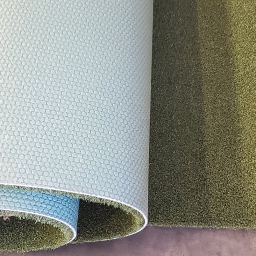
  • Tour Putt 15' x 15' Premium Putting Turf
  • Level 3 Gaming Computer
  • 24" Touch Screen
  • GSPro Golf Course Play Software
  • Computer Cabinet w/mesh doors for ventilation. (31.5" W x 15.74" D x 40" H)
  • Mounting Hardware and Installation Components: Adapter to HDMI to DisplayPort, surge protector PC, surge protector projector, projector pipe and elbow, Chirsmau projector mount, projector flange plate, and 35' HDMI.
Foresight FSX Software The Cradle At Pinehurst Resort
Foresight Falcon Launch Monitor

Foresight Falcon Launch Monitor

The Foresight Falcon has the largest hitting zone in golf, and its overhead design keeps the hitting area completely open, making it an outstanding choice for a home golf simulator and commercial teaching studio alike. It delivers tour-level ball and club data and is consistently ranked with Trackman among the most accurate simulators in golf. Combined with Foresight Sports' industry-leading technology, no-subscription-fee FSX software, and realistic graphics, the Falcon delivers the confidence, consistency, and performance serious golfers expect every time they step into the hitting bay.

Included with the Falcon: 

  • Foresight Falcon Overhead Launch Monitor
  • FSX Play Practice And Play Software
  • FSX 2020 Practice and Play Golf Course Software
  • Club Head Measurement
  • 25 Golf Courses
  • FSX Pro Performance Software
  • Foresight Fairgrounds
  • 2-Year Warranty
  • Automatic Latching Ceiling Mount
  • Calibration Wand
  • Power Cord
  • Ethernet Cable
  • Fiducial Dispenser
  • USB to USB-C Cord
  • Rubberized Tees (2)
Foresight Falcon Quadrascopic Camera Technology

Foresight Falcon Features:

Quadrascopic Camera Technology: The Falcon is powered by the same four high-speed cameras that are found in the GCQuad. It captures highly accurate ball and club data that you can trust for practice and play.

Tour-Level Ball & Club Data: Trackman and Foresight are the gold standard on the PGA Tour for launch monitors. With the Falcon, every swing is accurately measured without misreads.

Ball data includes: Ball Speed, Vertical and Horizontal Launch Angle, Total Spin, Spin Axis, and Carry Distance.

Club data includes: Club Head Speed, Club Path, Angle of Attack, Lie Angle at Impact, Face Angle at Impact, Smash Factor, Impact Location on Face, and Closure Rate.

Largest Hitting Zone in Golf: With a spacious 59" wide x 28" deep hitting area, it is easy to get the ball in the camera zone, avoiding misreads and creating a more relaxed hitting experience.   


LINK Enabled Technology Connects the Bushnell PRoX3+ Laser Rangefinder with Foresight's MyBag Assessments

Link-Enabled Technology: Foresight connects the Bushnell Pro X3+ LINK laser rangefinder directly with your launch monitor data to provide personalized, on-course club recommendations based on your actual distances. By syncing with your Foresight MyBag™ data, the X3+ rangefinder adjusts for elevation and environmental conditions, displays "Play As" yardages, and even factors in your club dispersion patterns—helping you make smarter decisions and play with the confidence of a tour professional. Simply install the Bushnell and Foresight Apps. Connect the Foresight App with your launch monitor. Complete a MyBag assessment hitting at least three shots per club to get your dispersion pattern, gapping, and overall distance. Connect the MyBag assessment to the Bushnell Golf App. Sync your accounts. Sync the Bushnell Pro-X3 laser rangefinder, and your MyBag Assessment is now in the rangefinder.
Bushnell Pro X3+ LINK Laser Rangefinder Side View

Bushnell Pro X3+ LINK Laser Rangefinder: This purchase includes a Free Bushnell Pro X3+ LINK Laser Rangefinder shipped separately at no additional cost.

Easy Overhead Installation: Mounted safely above the hitting area on a crossbar, the Falcon attaches with a few screws and keeps the floor completely clear. Unlike ground-based camera systems, there's nothing to set up, move, or accidentally hit. It's one of the reasons so many golfers and indoor golf businesses choose an overhead launch monitor for dedicated simulator rooms.

Perfect for Right- and Left-Handed Golfers: The large hitting zone is appreciated by families, instructors, and commercial facilities as it requires no repositioning of the launch monitor between golfers.

Foresight's No Subscription Fee, Life-Like FSX Play Software - Pebble Beach

Premium Foresight Software: The Falcon comes with Foresight's industry-leading subscription-free simulation and practice software so you can enjoy years of realistic course play, detailed performance analysis, and powerful game improvement tools. It's the same trusted software platform used by many of the game's top instructors, club fitters, and training facilities.

Fast Shot Recognition: The Falcon displays each shot and your data instantly, keeping your practice and golf rounds moving.

Built for Years of Use: Whether it's installed in a private home, teaching academy, or commercial golf facility, the Foresight Falcon is designed to handle years of regular play and comes with a two-year warranty.

Platinum Enclosure

The Platinum enclosure is Ace Indoor Golf's flagship, commercial-grade hitting bay. It gives you one of the most immersive indoor golf experiences possible. Over the years, we've designed and installed golf simulators for homeowners, teaching professionals, entertainment venues, and some of the largest names in the golf simulator industry. One thing we've learned is that the enclosure plays a major role in how realistic a golf simulator feels.

Unlike open-sided setups, the Ace Platinum creates a fully enclosed hitting environment that helps eliminate distractions, improve image quality and protection, and provide a more immersive experience from the moment you step inside. The oversized 15' wide x 15' deep x 10' high design allows you to comfortably swing every club in the bag while creating a large, theater-like viewing area for simulator play.

The Platinum's heavy, black canvas walls and ceiling help absorb ambient light, allowing the projected image to appear brighter, sharper, and more realistic. Whether you're practicing on the range or playing a bucket-list golf course, our customers tell us the Platinum enclosure helps transform their space into a true golf destination.

Benefits

Fully Enclosed Space: 15' wide x 15' deep x 10' high design helps eliminate distractions, improve focus during practice and play, and improve safety so you can focus on your game.

Commercial-grade construction: Engineered for long-term durability, screens last over a year in commercial high-use environments.

Floor-to-Ceiling Impact Screen: A unique and realistic floor-to-ceiling viewing experience draws you into an immersive golf experience.

2-Piece Screen System: The setup includes an easy-to-tighten front screen velcroing to the rear mesh screen for easy adjustment and elimination of sagging.

Premium Front Screen: Built from high-quality three-layer material, the front screen includes Velcro sewn into the webbing to connect it to the gap pads and frame pads. Commercial customers say this is the highest quality screen they have ever used.

Aluminum Frame: The lightweight aluminum frame is easy to assemble and comes with connector pieces, allowing complete assembly in 6 hours.

Top and Side Wall Skins: The wall construction boasts heavy, black canvas walls for durability and light control.

Fully Enclosed Space: Spacious interior accommodates right- and left-handed golfers comfortably, and the 15' depth improves ball containment and player safety.

Adjustable Aluminum Cross Bar:  This enclosure makes installing your overhead launch monitor easy. Designed to accommodate ceiling-mounted launch monitors such as the Uneekor EYE XO2, TrackMan iO, Foresight Falcon, and ProTee VX, the bar makes launch monitor attachment easy.

Kinedek Golf Hitting Mat

Kindedek Golf Hitting Mat

Included with this package is a 5' deep x 10' wide Kinedek golf hitting mat. Built to handle the demands of a true commercial environment without sacrificing feel. Its durable, commercial-grade nylon turf is soft underfoot, delivers a realistic strike that mimics real grass, and is easy on a golfer's body. The modular tray system keeps the turf locked in place for consistent performance and no slipping. Designed for both indoor simulators and high-traffic outdoor tee lines, the turf holds real tees, absorbs impact, and provides a stable, professional hitting surface players can rely on swing after swing.

Features & Benefits

Commercial-Grade Turf: The turf is made from durable, UV-resistant nylon that's built to withstand thousands of golf shots without flattening or wearing out prematurely.

Accepts Real Tees: Insert a real tee directly into the turf, so every driver session feels more like practicing on the course.

Large 5' x 10' Surface: Our customers praise the oversized design that gives both right- and left-handed golfers plenty of room to hit.

Comfortable to Practice On: The shock-absorbing base helps reduce the stress that repeated practice can put on your wrists, elbows, shoulders, and knees.

Stable Footing: The durable tray firmly holds the turf in place for a solid foundation that feels like real turf underfoot.

Sloped Tray Edges: Designed to allow balls to easily roll back up onto the turf, the sloped tray edges make practice easier.

Built for Frequent Use: Whether you hit a bucket of balls every evening or spend hours practicing on the weekend, the Kinedek is made for golfers who play often.

Professional Finished Look: Beyond performance, the Kinedek gives your golf simulator a clean, finished appearance that complements a premium installation.


Epson L695SU Laser Short Throw Projector Front View

Epson PowerLite L695SU Short Throw Projector 

The Epson PowerLite L695SU Short Throw Laser projector is one of our best-selling projectors. It combines 6,200 lumens for a bright Full HD WUXGA picture, commercial-grade reliability, wide lens shift, 360-degree mounting, and installation flexibility with an expansive 0.79 - 1.36 throw ratio that projects an image up to 400" wide. Whether you're playing a casual round with friends or practicing every day, the L695SU provides crisp, sharp graphics and spectacular color that you'd expect from a high-end golf simulator.


    6,200 Lumens of Brightness: The 3-chip, 3LCD technology produces a vibrant image with rich colors in rooms with more light.

    3LCD Laser Technology: Delivers natural colors without the rainbow effect found in some projectors. It eliminates flickering when using the ProTee VX swing cameras.

    WUXGA Resolution: Offering a native 16:10 aspect ratio, the L695SU accepts up to a 4K signal and provides 1920 x 1200 resolution that makes fairways, sky, and trees remarkably realistic.

    4K Signal Compatible: Works seamlessly with today's leading golf simulator software, accepting 4K input.

    Laser Light Source: Provides up to 30,000 hours of virtually maintenance-free performance in Eco Mode, so you can spend more time golfing and less time worrying about replacing lamps.

    Easy Installation: Optical zoom, lens shift, and keystone correction features allow you to align the image edge-to-edge on your impact screen perfectly.

    Commercial Durability: Offering up to 30,000 hours of laser light source for golf simulator use.

    Wi-Fi 6/6E: Get fast, reliable wireless connectivity for screen casting and connection to cloud-based services.

    Professionally Selected: We don't choose projectors based solely on specifications. We choose products we've installed, tested, and trust to deliver the best experience for our customers.

Tour Putt Turf Top and Underside View

Tour Putt Ultimate Green 15x15 Turf

Tour Putt Ultimate 15' wide x 15' deep turf brings a true putting green experience into the ProTee VX Enterprise package by delivering the look, speed, and feel of a real bent-grass surface. Built with high-quality nylon fibers and a durable rubber backing, it produces a smooth, consistent ball roll in the mid-10 stimp range—ideal for putting, chipping, and approach shots. Designed for commercial durability and low maintenance, this non-infill turf holds up under heavy traffic while giving players the confidence of practicing and playing on a surface that reacts just like a real course.

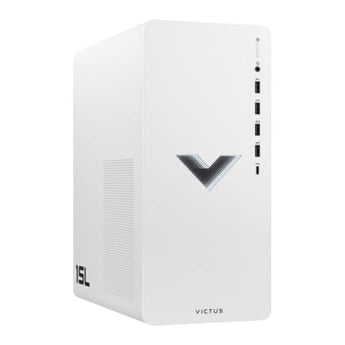
Level 3 Desktop Computer

Gaming Desktop Computer

Part of this simulator package is a Level 3 Gaming Computer built to run your ProTee VX system the way it’s meant to be used—fast, smooth, and without headaches. It handles ProTee VX software and swing cameras effortlessly, with a powerful processor, 16GB of RAM, a lightning-fast 1TB NVMe SSD, and an NVIDIA GeForce RTX graphics card delivering clean visuals and quick response every time you step in. Whether you're running a busy facility, hosting leagues, or working with players one-on-one, this is the kind of reliable performance you can count on day after day.

24

24" Touchscreen Monitor 

Make interacting with your simulator software easier with the 24" Touchscreen Monitor and wall mount. With a bright, clear display and accurate touch response, players can easily select clubs, courses, target locations, and navigate the software without needing a keyboard or mouse. Built for everyday use in busy environments, it’s a durable, user-friendly control center that keeps everything moving seamlessly—from first swing to final putt.

Courses/Software

Falcon Courses:

Beaver Hills Country Club, Blue Bayou Golf and Fishing Club, Broken Tree Golf Course, Butterfield Country Club (Red/Blue), Kinsale Golf and Fitness Club, Linfield National Golf Club, Tall Pines, Teton Pines Golf Course, The Farms Golf Club, Willow Crest Golf Club, Awbrey Glen Golf Course (FSX Play Only), Barren Boulders Executive (FSX Play Only), Black Rock Golf Course (FSX Play Only), Detroit Country Club (FSX Play Only), Glen Flora Country Club (FSX Play Only), Greencastle Golf Club (FSX Play Only), Meadowbrook Country Club (FSX Play Only), Mill Creek Golf Club (FSX Play Only), Potter's Park Golf Course (FSX Play Only), Prairie Bluff Golf Club (FSX Play Only), Sunnyside Golf & Country Club (FSX Play Only), The Bedens Brook Club (FSX Play Only), Twin Run Golf Course (FSX Play Only), Wellington National Golf Club (FSX Play Only), and Tropical Paradise Executive (FSX Play Only).

Software (No Subscription Required)

FSX 2020 Software: Experience the golf course in 4K resolution with FSX 2020 golf simulation software, which is among the most realistic in golf simulation. The GCQuad includes courses, skills challenges, driving ranges, and access to the Foresight Sports' online network to save data from every session to the cloud. FSX 2020 User Manual (Download)

FSX Play: Gone are the days of pixelated fairways! FSX Play software ushers in a new era of golf simulation graphics. This cutting-edge software boasts a completely revamped engine, delivering unparalleled realism. Lush 3D grass textures, meticulously crafted lighting effects, and a sleek, modern user interface transport you directly onto the course or driving range. With smooth, seamless gameplay, every swing feels true to life, making FSX Play the ultimate virtual golfing experience with HD courses and driving ranges. FSX Play User Manual (Download)

FSX Pro: The ultimate performance insight tool for the game's best players, coaches, and club fitters, FSX Pro golf simulation softwareincludes a dual display mode and custom settings that let you decide what information you- and your client- see on screen. Features include intuitive 3D visuals that show the performance of every shot, easy-to-use gap analysis, and easy-to-generate email reporting. 

FSX Pro iPad User Manual (Download)
FSX Pro Download and Installation Guide (Download)

FSX Pro User Manual (Download)

Foresight Sports Performance App: When connected to a GCQuad via Bluetooth or WiFi, the Performance App instantly delivers data from the launch monitor to an Apple or Android device. Foresight Performance Fitting App User Guide (Download)

Fairgrounds Game Suite: Foresight Fairgrounds is a free suite of family-friendly mini-games for FSX2020 and FSX 2018 users. It features your favorite classic games such as skee ball, bowling, and darts, reimagined for players of all golf skill levels to enjoy. Foresight Fairgrounds User Guide (Download)

Essential Putting Analysis (Software Add-On): The Essential Putting Analysis Add-On software puts unrivaled putting insight at your fingertips. From post-impact ball launch and skid measurements to precisely calculated roll distance, fitters, coaches, and players now have new insights on their putting game that can help them experience a higher level of putting performance. Putting Data Measurements Include:Ball velocity, Vertical launch angle, Horizontal launch direction, Total spin, Spin-tilt axis, Back spin, Side spin, Club speed, Smash factor, Club path, Angle of attack, Impact face angle, Impact lie, Impact location , Skid rate, Time to full roll, and RPM's at full roll. Foresight Essentials Putting Analysis Guide (Download)

Resources/Space Requirements

ProTee VX Platinum 15' Golf Simulator Space Requirements

Platinum Enclosure Dimensions: 15' L x 15' W x 10' H 

Recommended Space Requirement: 22' L x 17' W x 11' H

Minimum Space Requirement: 18' L x 16' W  x 10.5' H

Less Space? Call us. It can be done. Size of golfer and clubs swung reduce space requirements.

Screen to Tee Center: 10' 

Behind Screen: 1’

Monitor Center to Tee Center: 3' 7" when mounted 10' above ground


ProTee VX Computer Specifications:

Minimum required

  • OS: 64 Bit Windows 10
  • Processor: Intel Core i7-8xxx @ 3.00GHz (or AMD equivalent)
  • Memory: 8 GB RAM
  • Graphics: NVidia RTX 3060 (or Radeon equivalent)
  • Network: Broadband Internet connection
  • Hard Drive: 5 GB available space

Recommended when used with Golf Gaming Software

  • OS: 64 Bit Windows 10 or 11
  • Processor: Intel Core i9-9xxx @ 3.00GHz or greater / AMD Ryzen 9
  • Memory: 16 GB RAM or more
  • Graphics: NVidia RTX 3080 or better / Radeon RX 6800XT
  • DirectX: Version 12
  • Network: Broadband Internet connection
  • Hard Drive: 30 GB available space
  • Sound Card: DirectX 12 compatible

ProTee VX User/Setup Guide

ProTee Warranty