
Allow 7-days for shipping .Get 2 swing cameras. No Sales Tax, Except Ohio. Free Shipping!

ProTee VX Launch Monitor

ProTee VX Launch Monitor

Regular price $6,500.00
Regular price $8,125.00 Sale price $6,500.00
Shipping calculated at checkout.
ProTee's VX launch monitor delivers exceptional shot tracking through its dual high-speed cameras and AI algorithm. It captures data with impressive speed and accuracy at a fraction of the cost and doesn’t require specially marked golf balls. Plus, Free GolfCore software for course play.Full Description
View full details

Description


ProTee Offers Overhead Launch Monitor Value!

The ProTee VX launch monitor is an artificial-intelligence powered overhead launch monitor that features a dual high-speed camera system that tracks shot data in milliseconds with remarkable precision. The VX has redefined the simulator space by providing the highly-accurate data at a significantly lower price without the need for specially marked balls. Plus, ProTee created a simple mounting and calibration process for the VX that allows you to complete the setup in minutes.

Allow 7 days for shipping. Get 2 swing cameras. No Sales Tax, Except Ohio. Free Shipping!

Included with ProTee VX:

  • ProTee VX Launch monitor
  • Calibration board
  • Black Stainless Steel Mounting Plate
  • USB 3.0 to ethernet adaptor
  • 32' UTP Cat6 Network Cable
  • Power cord
  • 4Four screws and four plugs for mounting plate

The VX is extremely competitively priced, and it comes preloaded with software ready to go with no activation fee and no subscription. It is one of the few launch monitors left with no subscription fee, and it includes all the needed data points, including AI-powered club data. The ProTee VX is one of the first launch monitors to use AI and has taken thousands and thousands of pictures of the golf ball/club face contact to generate more accurate club data. It allows you to scale the data to increase or decrease the size of the ball and club data numbers versus the graphics. The monitor requires a high-performance PC with an Intel Core i7-8xx or higher processor. See the Resources/Space Requirements tab below for a full list of computer requirements.

ProTee GolfCore GC 7

ProTee VX Features:

High-Speed Cameras: Two high-speed cameras capture ball and club data instantly. ProTee's artificial intelligence and Machine-Learning powered shot analysis measures and outputs your data in less than a second. 

Ball Data: Ball Speed, Total Spin, Spin Axis, Back Spin Side Spin, Launch Direction, Launch Angle, Flight Path, Apex Height, Apex Time, Total Distance, Carry Distance, Off Line, Air Time, Run, and Descent Angle.

Club Data: This unit does not require club stickers and generates the following club data: Club Speed, Swing Path, Club Face Angle, Club Face to Path, Attach Angle, Dynamic Loft, Club Lie Angle, and Vertical & Horizontal Impact Point.

Golf Course Play: This launch monitor and its software allows you to connect to 3rd party software like GSPro, E6 Connect, Creative Golf 3D, and the TGC 2019.

Multiview Software: Open multiple windows at the same time.

Game-Changing Video Replay: The ProTee VX gives you a clear look at your swing in a way that’s actually useful. Instead of relying on feel, you can watch everything unfold—right down to the moment of impact. With built-in replay, two full-body swing cameras (Included), and built-in drawing tools, you get a complete view of what your body and club are doing. Slow it down, study the details, and see exactly how the ball reacts with easy-to-read spin visuals. It’s the kind of feedback that makes adjustments easier and progress a lot more obvious.

Hitting Area: The VX overhead launch monitor has a hitting area that can be configured to a maximum size of 25" long x 21" wide.

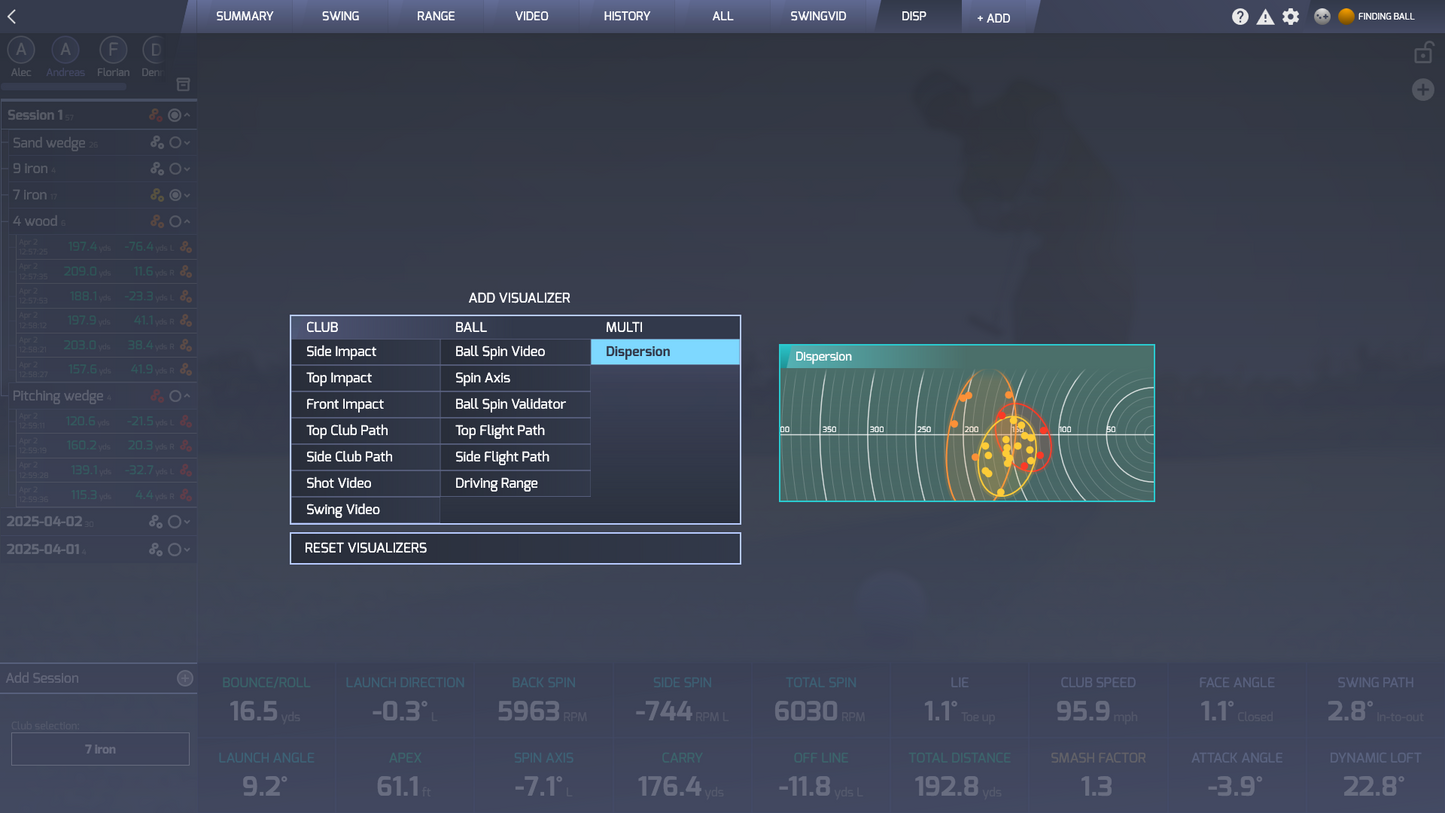
ProTee Labs Perpetual License:  This software helps you improve your golf swing and features customizable panels, high-definition playback videos, and a dedicated practice range. The intuitive layout ensures you can instantly access and view your data after each shot in a clear and organized format.

Easy Setup: ProTee's easy to use mounting and calibration system makes setup effortless. You'll be playing indoor golf in minutes.

Right and Left Hand Golfers: Some overhead launch monitors require unique spots for left and right hand golfers, with the ProTee these users can hit from the exact same hitting location. 

UnMarked Golf Balls: You do not need marked golf balls with the ProTee VX, but it does require some type of 


Putting Practice: The ProTee VX gives you putting feedback that actually helps you understand what’s going on, not just the result. It tracks how the ball rolls and what the club is doing at impact, so you can see why a putt started on line—or didn’t. It’s a simple way to dial in speed, tighten up your stroke, and start feeling more confident over every putt.

Ceiling Mounted: The ProTee VX golf simulator is an overhead mounted launch monitor that works for both right and left handed players without having to recalibrate or reconfigure the launch monitor. 

logo on the golf ball to capture club data.

Course Play: Coming this Spring, ProTee VX will introduce GolfCore their free new course play, practice, compete software that will include the ability to create courses with Lidar. The VX also connects with third party golf course software. See golf course tab below. 

ProTee GolfCore Golf Course Simulation and Gaming Software Coming End of March 2026.

Golf Core golf simulation provides golf course play simulation, driving range practice, games/competition, and course creation by loading in Lidar data or searching for existing data in the course browser. It will be available for ProTee users free this Summer 2026 to existing and new VX users! 

Courses/Software

ProTee VX Golf Courses:


It is the next step forward for ProTee VX users—and it’s built to make your simulator feel a whole lot more like actually being on the course. Powered by Unreal Engine 5, everything from the lighting to the landscapes feels sharper, smoother, and more real. It’s not just about better graphics—it’s about creating an experience that pulls you in and keeps you playing. Even better, a free beta is expected to roll out to both current and new VX owners by the end of Q1 2026. 


Currently course play requires a third party software subscription from , E6 Connect, or Creative Golf 3D. 

ProTee Labs the analysis software that provides all the data when you launch a shot.


Key Features of ProTee GolfCore

Create Your Own Courses: Ever wanted to design your own track? Now you can. Use LiDAR data for real-world accuracy or build something completely from scratch with simple, intuitive tools.

Graphics That Actually Feel Real: Unreal Engine 5 brings depth, lighting, and detail that make you forget you’re indoors.

More Ways to Play: Tee it up for a full round, hit the range, or try out courses created by other players in the community.

Free for VX Owners: No extra cost—if you have a ProTee VX, you’re in.

Built to Keep Getting Better: This is just the start. Expect regular updates, new features, and improvements driven by real user feedback.

Resources/Space Requirements

ProTee VX Space Requirements: 


Minimum Space Requirement: 18'L x 10'W x 9.5'H

                                                 16.5'L x 14'W x 9.5'H (If not using putting sensor)

Less Space? Call us. It can be done. Size of golfer and clubs swung reduce space requirements.

Recommended Space Requirement: 22'L x 14'W x 10'H

Monitor to Floor: 9' - 10' feet

Screen to Tee Center: 8.5' - 10' (8.5' if not using putting sensor)

Behind Screen: 1’

Monitor Center to Tee Center: 3" - 4" when mounted 9' above ground

Monitor Center to Tee Center: 3' 7" when mounted 10' above ground

Ceiling Height: Room to swing desired club

Swing Area from Tee center: 7' all around


ProTee VX Computer Specifications:

Minimum required

  • OS: 64 Bit Windows 10
  • Processor: Intel Core i7-8xxx @ 3.00GHz (or AMD equivalent)
  • Memory: 8 GB RAM
  • Graphics: NVidia RTX 3060 (or Radeon equivalent)
  • Network: Broadband Internet connection
  • Hard Drive: 5 GB available space

Recommended when used with Golf Gaming Software

  • OS: 64 Bit Windows 10 or 11
  • Processor: Intel Core i9-9xxx @ 3.00GHz or greater / AMD Ryzen 9
  • Memory: 16 GB RAM or more
  • Graphics: NVidia RTX 3080 or better / Radeon RX 6800XT
  • DirectX: Version 12
  • Network: Broadband Internet connection
  • Hard Drive: 30 GB available space
  • Sound Card: DirectX 12 compatible

ProTee VX User/Setup Guide

ProTee Warranty

FAQ

ProTee Labs software is unable to establish a connection with the ProTee VX launch monitor.

  • Check if the power cord is connected to the ProTee VX.
  • Make sure the Ethernet Cable is connected to the VX and to USB Ethernet Adapter.
  • Check if the USB Ethernet adapter is connected to a USB 3.0 port on your computer.
  • Does the power switch turn red when you power on the VX?
  • Do the 2 lights switch on for a couple of seconds after you powered on your VX?
  • Can you hear a fan noise coming out of the VX monitor?

If the ProTee VX is still unable to connect, disable the Windows firewall and/or antivirus software.

The ProTee practice and play software is lagging when using a monitor along with a projector.

Review the resolution settings for your projector and monitor and make sure they are set to the same resolution and refresh rate.