


Garmin Approach R50 Launch Monitor And Simulator
Garmin Approach R50 Launch Monitor And Simulator
Regular price
$4,499.99
Regular price
$4,999.99
Sale price
$4,499.99
Unit price
per
Shipping calculated at checkout.
Enjoy golf all year round with the Garmin Approach G50! This premium golf simulator and launch monitor features 43,000 preloaded courses, ball and club metrics, impact video, putting, and a 10" built-in color touchscreen display for a seamless experience without a computer or mobile device.Full Description


Description
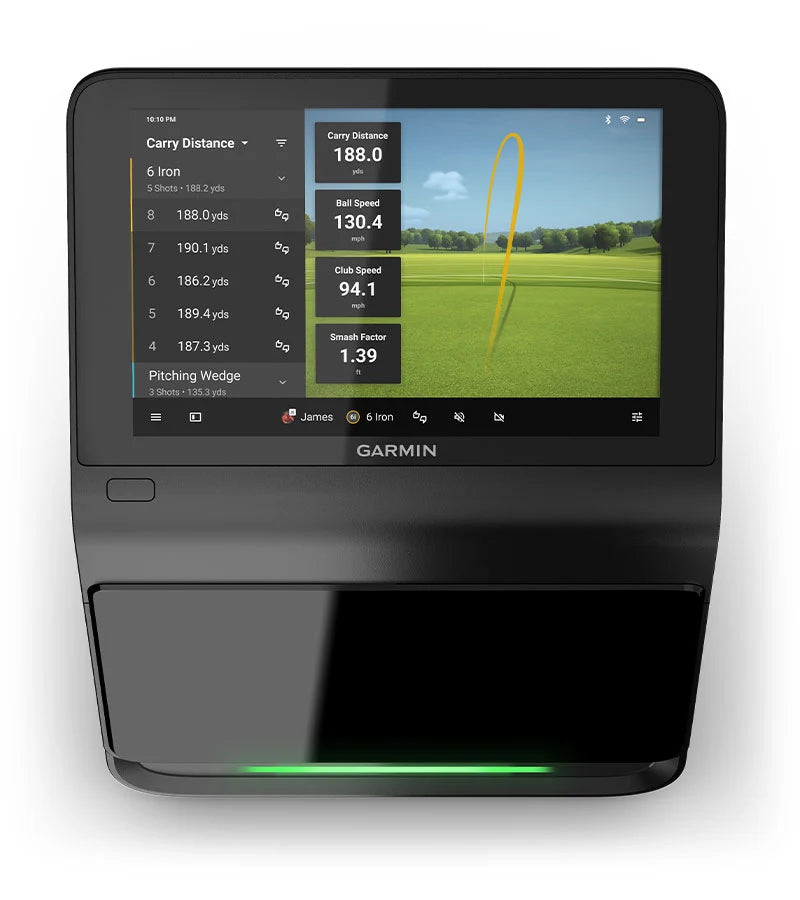
Play golf year-round with the Garmin Approach G50! This premium level golf simulator and launch monitor includes 43,000 built-in courses, more than 15 ball and club metrics, high-speed club impact video, compatibility with every club in your bag, including putters, use indoors or outside, and a 10" built-in color, touchscreen display.
Included in Approach R50 box:
- Approach R50 premium golf launch monitor and simulator
- Carrying case
- AC adapter and power cord
- 250 club tracking stickers
- Documentation
Garmin Approach R50 Features:
Play & Practice: Using your Garmin launch monitor, you can take Target Practice, play 43,000 golf courses with Home Tee Hero*, make challenging putts, or use the driving range.
Ball Data+: Ball speed, carry distance, total distance, deviation distance, smash factor, launch angle, launch direction, spin rate, spin axis, and apex height.
Club Data+: Club head speed, club face angle, angle of attack, and smash factor.
Measurement Technology: Not one but three high-speed cameras capture club and ball data so you can improve your game.
Color Touchscreen: The G50 has a 10" color touchscreen display with 800x1280 pixels. As a result, it does not require a dedicated PC to operate. You can view all data on the 10-inch screen.
Golf Course Play*: Play indoor golf on 43,000 courses from around the world with a Garmin membership and the Home Tee Hero App.
Impact Video: View high-speed impact footage and get visual feedback that improves your ball striking.
Training Mode: Save and monitor club and ball statistics for every club and generate a shot dispersion chart using an advanced ball flight trajectory model so you can track and compare stats over time.
Built-In Barometer: With this sea-level adjustment, you'll get more accurate distances based on your current location. You can also manually adjust the pressure to prepare for varying conditions.
Leaderboards: Play in weekly tournaments with scores posted to Garmin's global leaderboard.
Garmin Golf App: You can view metrics from your R50 on a compatible smartphone with the mobile App.
Portable: Get up to 4 hours of battery life for extended range time.
Connectivity: If you want to project the R50 data onto a larger screen, you can connect to a projector using the HDMI cable. Additionally connectivity includes USB-C, Bluetooth and WiFi
Carrying Case: Project and transport your Approach G50 with this easy-to-use carrying case.
*Subscriptions required
+ Stickers required to capture club metrics.

Approach R50 Subscription Plan
Purchase a Garmin Golf membership to access premium features and course play. The subscription fee is $9.99 monthly, or $99.99 annually, and is purchased directly from Garmin when setting up your launch monitor. The subscripiton gives you access to the Garmin Home Tee Hero App and its extensive course library. The R50 is also compatilbe with third party software like GSPro, Awesome Golf, E6 Connect, and E6 Apex.
| Membership Options | Free with Garmin Golf App | Monthly/Annual Plan |
| Upload Scorecards | O | O |
| Review Shot History | O | O |
| Review Performance Stats | O | O |
| Participate In Weekly Leaderboards | O | O |
| Create Tournaments | O | O |
| Save Driving Range Sessions | O | O |
| Green Contours | O | |
| Store Video Clips (R10 only) | O | |
| Home Tee Hero Course Simulator (R10 and R50 only) | O |

Courses/Software


Garmin Golf Course List
Garmin Approach R50 Software
The Garmin Approach R50 is designed to be simple right out of the box, powered by its built-in Home Tee Hero software. With access to 43,000+ courses, you can jump straight into full rounds, practice sessions, or quick games without needing a separate computer. The graphics are smooth, the experience is intuitive, and features like high-speed impact video playback give you valuable feedback after every shot. (Home Tee Hero subscription required.)
For golfers who want to expand their setup, the R50 also works with leading third-party software like GSPro, E6 Connect, and Awesome Golf, giving you flexibility to build a more advanced simulator experience.
Key Features
Home Tee Hero (Built-In): Play full rounds, practice any hole, or compete in weekly tournaments across thousands of real-world courses—all directly on the R50.
On-Course Practice: Drop a ball anywhere on any course and work on the exact shots you want to improve, whether it’s approach play, short game, or recovery shots.
Third-Party Compatibility: Connect to PC or iOS devices to run popular simulator software like GSPro, E6 Connect, and Awesome Golf.
Controller Mode: Use the R50 as a Bluetooth controller to navigate and control third-party simulation software seamlessly.
Easy Updates: Keep your system current with wireless updates via Wi-Fi or Garmin Express, ensuring you always have the latest features and improvements.


Resources/Space Requirements
Garmin R50 Space Requirements:

Recommended Space Requirement: 21'L x 14'W x 10"H
Less Space? Call us. It can be done. Size of golfer and clubs swung reduce space requirements.
Minimum Space Requirement: 15' L x 10' W x 9' H (13' for dual-handed setups)
Monitor Position: Ground - 1-2' in front of ball
Screen to Tee Center: 8' minimum
Wall to Screen: 1’
Ceiling Height: Room to swing desired club
Swing Clearance from Tee center: 6-7' all around
Specifications:
Dimensions: 16.5" x 10.6" x 7.5"
Weight: 9 lbs
Water rating: IPX3
Touch Screen: Yes
Display Type: LCD
Display Size: 10"
Display Resolution: 800 x 1280 pixels
Battery Type: Internal rechargeable lithium-ion
Battery Life: Up to 4 hours
Garmin Approach R50 Owners Manual
All prices are subject to change. All plans are billed annually or monthly. Selected plan auto-renews for the same duration as the original term unless user changes plan selection or cancels before the next renewal date. U.S. plan prices do not include applicable state/local taxes. Unless stated otherwise, non-U.S. plan prices do not include applicable VAT or other taxes. Read the Terms and Conditions for Garmin Subscription Services and Terms and Conditions for Garmin Golf Membership.
Engineering enhancements are ongoing and may not be reflected in the pictures, videos, and specifications.
FAQ